Sunday, 28 December 2014

Week 12 - 14: So This Is Christmas!

Enjoying The Holidays

Hey, just thought I'd update my blog quickly. The Christmas holidays are on-going and I am thoroughly enjoying getting a bit of a break. I spent a couple of days up north to celebrate Christmas with my brother and his fiancé and it was pretty good. Apart from that not much is happening. I am playing a couple of games and I recently have got myself hooked on the Phoenix Wright: Ace Attorney series. Definitely a great series of games and I can only recommend it. It shows how much of an impact a good story can have on a game!

At the same time I am participating in the SkySaga: Infinite Isles alpha test. I can definitely see how the game has potential to be a great hit and I enjoy providing feedback to the devs to help improve it. At the moment there isn't too much content in the game, but it is constantly being updated, with a massive amount of new content added recently with the start of the second alpha test. I can't wait to see what they will add next. I might eventually post a little review about it here.

Concerning work I am not doing as good. I guess I just need to have a bit of a break, so right now I am not working on anything. I am however slowly easing my way into it again to prepare myself for the upcoming term. I have learned a lot over the past term and I hope that I will be able to use it in the next few projects.

Until then - Merry Christmas and a happy new year!~

Saturday, 13 December 2014

Week 11: Too Late For Regrets (Dichotomous Characters Post-Mortem)

(Not So) Well-Defining Textures

I finished off my last blog post with a screenshot of my model and just for completion's sake, I will post another screenshot of the model with textures. I used the ink 'n paint material in 3ds max to give the whole model a cell-shaded look and while this was already quite hard to get right, it wasn't the biggest problem that I had with my textures:
Textured Angel Character
The main reason I think that my textures have failed is because I simply overestimated the power of normal maps. I relied on adding quite a lot of detail into the mesh by using normal maps, however I couldn't exactly get it to work as well as I had intended. Together with the stress I had from running closer and closer to the deadline I just had to draw a line and ultimately was forced to hand in my work as it was: "Done, but not polished."

The project is over and while I am definitely glad that it is done, I wish I could've gone back in time to start over! There was quite a few things that I could've done better.

What Went Wrong?

So, where exactly did I fail? As much as I hate to admit it, I think I definitely spend way too much time concepting (once again), however this was not fully intended by me. I had quite a lot of struggles coming up with an idea and after 2 failed attempts I finally managed to get at least something, yet I still think that while my concept wasn't too bad, it's nowhere near as strong as it could've been.

The idea was quite cliché and my failed attempt at making it more unique when doing my colour studies didn't help. I really tried hard for the demon character but when it came to the angel character I kind of had lost a bit of motivation and instead of actually doing it, just resorted to going through various colours in my head. It became clear to me that I thought, that my darker value on the dress would not work, as I couldn't think of any colour that an angel's dress could have, however I think I should've definitely just tried it out, just to be certain.

Since I spent a lot of time concepting, my time for creating the model was very limited. The whole model was done in less than a week and it definitely shows. I intended for it to be quite low poly, however I ended up with just under 2000 tris, which while compared to modern game characters seems not too high, it would've been easy for me to achieve a tri count of less than 1000.

I had managed to waste quite a lot of polys and comparing my model to my original concept, shows that I have lost quite a bit of roundness. The model looks a lot more edgy and overall the silhouette doesn't quite match up. If I were to do my model again I would focus a lot more on roundness and putting tris where they are actually needed, but I would also try and add in a bit more detail to make the model look a bit more like the original concept.

Looking Ahead!

Like the title says: "It's too late for regrets now." The project deadline has passed and I need to look into positively into the future. Christmas is coming up and I will be getting my well-deserved rest, but once I am back I will aim to put more effort into creating my models in future project. Hopefully I will be able to produce some great work.

Stay tuned~

Monday, 8 December 2014

Week 10: 'Tis The Season!

Slowly Finishing Up!

Christmas is coming up! - And with that the first term is slowly coming to an end. The third week of the character project has just finished and as it stands I have now got a complete model that needs to be unwrapped and textured. Thankfully we received an extension for the project last week so that now I will have time to finish off and wrap up this project in the upcoming week. Enough of me talking, here is some pictures:
Value Studies
I had wrapped up my last post by saying I would be doing colour and value studies during this week so that is the first thing I started doing during the week. I didn't want to use complete white or complete black for my value, but I really liked how the wings of my angel character looked when they were completely white so I stuck to that. I also noticed that a darker value on the dress gives a lot more contrast to the whole figure.

For the demon character I noticed quickly that I had to have a clear difference in the values for the legs and upper body and also make sure the values for the upper body and head were the same, so I ended up tweaking around the value of the tail and soon found my favourite. However I still wasn't quite sure which values to go for on my angel character so I picked 2 and paired them up together with the demon to make my final decision:
Value Pairs
After I had picked my values I then went onto doing some colour studies:
Colour Studies
I wasn't particularly keen on my results. I tried to stay away from the cliché red demon, I really did, however I just didn't think any of the other ones really worked. So in the end I decided to stay with the cliché and made a matching white angel. Like I said, I am not particularly keen on what I have got out of this, but I did try hard, so here's my final:
Final Dichotomy Characters
I then had a quick think and decided I would model the angel, so I quickly drew up some orthographics to help me model:
Angel Orthographics
After that I went straight into modelling, which wasn't too hard, however I encountered a few problems:

The first problem I encountered was the bottom of the dress. I'd end up having to model overlayed fabric, which wasn't quite easy to get my head around at first. Eventually I decided that I will use mostly normal maps to solve that problem.

My second problem was how much detail I wanted to have in my model. I wanted for it to be rather low poly and when it came to modelling the wings I simplified them a bit to not push my limit to far. 

My final problem was the hair. I wasn't quite sure how I would model it and eventually decided to just make a basic head model and then stick the hair on top which I would create by edge modelling. The final result, coming in at just under 2000 tris, wasn't too bad so I stuck with it:
Angel Model
As you can see, I simplified the dress quite a bit. The head is also quite flat, but that is because I intended for the facial features to be simply painted on, as it has been done in Wind Waker as well.

Last Week of Term

So here we are, it's the final week of term before Christmas holidays! I'm never really overly excited about Christmas, but it's definitely a nice time and for my a definite well-deserved rest. I was originally planning on staying in Leicester over Christmas, however eventually I decided that I'd go up for a few days to visit my brother instead. I will be sure to keep this blog updated over Christmas though~

Sunday, 30 November 2014

Week 9: Character Project Update

A lot of Failure!

Hey everyone, another week has passed and it's time for an update on my current progress. After my failed first attempt at the new dichotomy character project last week, I went back to the drawing board and did my set of abstract silhouettes just using basic shapes. Here is the result of that:

I did a full set of 100 silhouettes, continuously adding on more detail and while the last few silhouettes were starting to give me some great shapes I just failed to see anything of value in them. Not having a clue at all in which direction I was going to take this project, I went to ask for help from the tutors and pretty much started over again.

The Beginnings of a New Idea

This time I started by coming up with a list of opposite words that I could use as a theme for my characters. This included some opposites such as "Hot and Cold" and "Alive and Dead". I then ended up picking out "Heaven and Hell" as my chosen opposites and created a moodboard based on those 2 terms:
Heaven and Hell Moodboard
After that I then thought about a style that I wanted to use for my characters and decided to go for a more stylised look and stick to a similar style to the one they used in The Legend of Zelda: Wind Waker. Again I created a moodboard to help me stick to my chosen style:
Wind Waker Moodboard

Development

After my 2 moodboards were created I went into idea generation once again and started off by creating a basic silhouette of an angel-like character using the simplified Wind Waker style. I did the same to create a basic shape for a demon-like character. I then used silhouettes of simplified objects that I could attach to both characters (such as wings, clothing, claws, etc.):
First Set of Silhouettes

After my first batch of silhouettes was done I then went into creating a second batch and mixing different elements of the silhouettes up a bit to see which would work best:
Second Set of Silhouettes
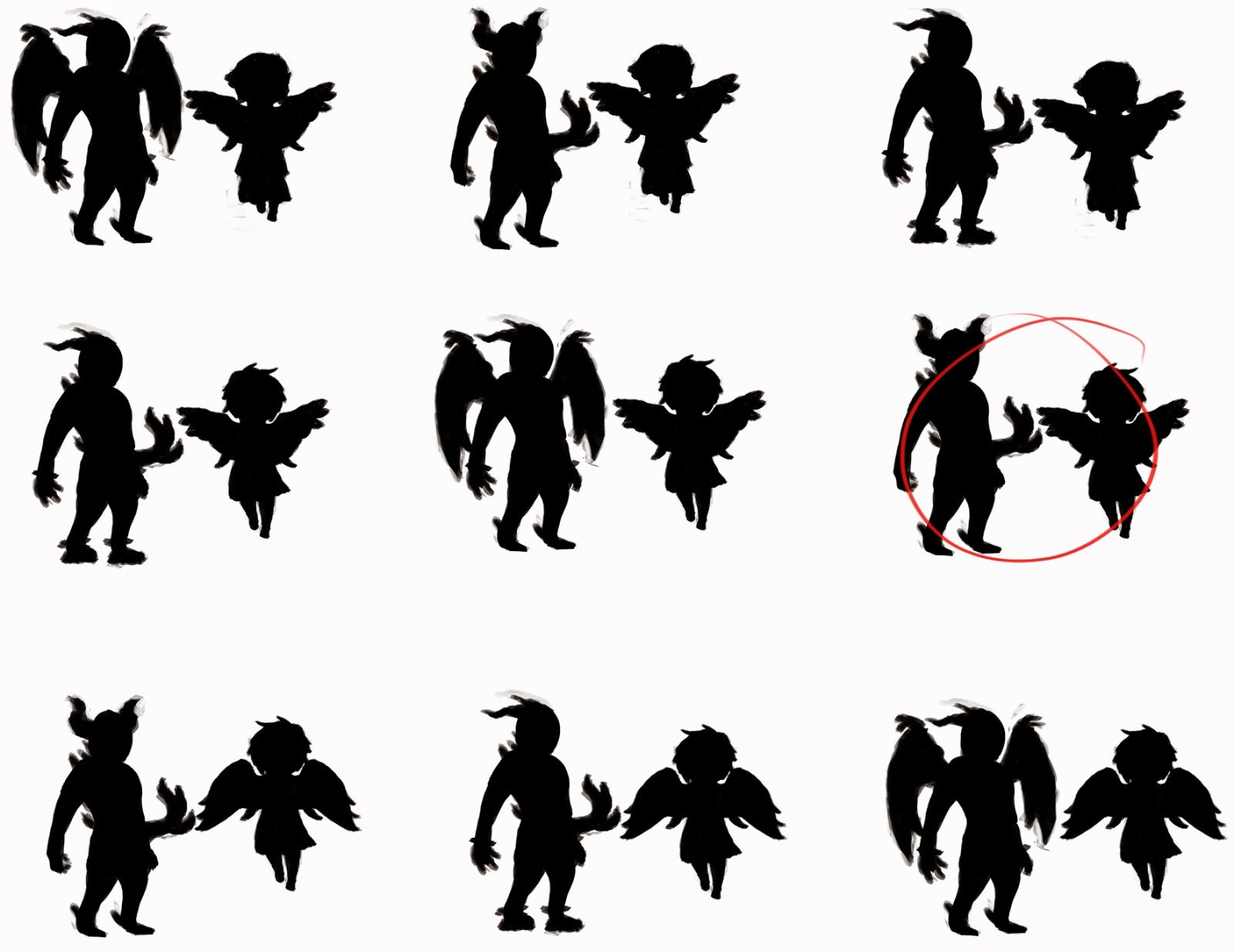
I then picked out a few silhouettes that worked well and paired them up together to see which would make the best pair:
Pairing up Silhouettes
Eventually I decided that number 6 was the best, since the silhouettes are quite different, which is strengthening the dichotomy aspect of the duo. I decided that I didn't want both characters to have wings and that the upwards facing horns seemed to work best to make the demon character look a bit more intimidating. After I had chosen my pair I then went into painting on some detail onto the silhouettes. Again I tried to stick close to the Wind Waker art style, which turned out to be quite a challenge:
Detailed Final Silhouette
After I had finished painting on detail I then inverted the picture to give me white silhouettes with a black outline and then refined it a bit. I also realised that I wasn't too happy with the demon's face so I changed it around a bit:
Final Silhouette Design
I then put them both onto a grey background, so that I am now ready to continue by doing a few quick value and colour studies. Unfortunately I haven't yet had the chance to do those, so they'll be on my next blog post.

Critical Analysis


I am still not overly happy with my design, but I am a lot happier with this than I was with my original fox and goose and I am also running out of time slowly. We have finished the second week of this project and the whole project was only supposed to be 3 weeks long, but we did receive an extension of an extra week a few days ago, bringing the deadline up the end of this term, so hopefully I should easily be able to get the project done in time.

Next week I will focus on getting the concept done and then creating one of the characters in 3D. I have yet to decide which character I will end up modelling, but my tendency at the moment is going towards the angel character. Mostly because I think it will be a lot more interesting thinking about how to model the clothing, wings and hair. Nonetheless I will wait before I make my final decision until after I have done my value and colour studies.

That's it for this week. I will update my blog once again next week to give you another bit of insight and hope that I will be able to show off a bit of 3D work. Stay tuned~

Saturday, 22 November 2014

Week 8: From Objects to Lifeform

Character Project

We started a new project again this week, this time we have to design a dichotomous character duo and then take one of those characters and create a 3D model of it. We have been given 3 weeks to do so and are told to stick to a given timeline and in return have been given complete freedom as to what we can do. The only rule to this project is that it has to be 2 characters that are dichotomous, but live in the same universe.

This is different to any other projects we had done before and for the first time ever we are stepping away from our usual realistic style at DMU and are being given freedom to explore other artistic styles, which is certainly interesting. Of course, since there aren't any guidelines for us to stick to, we could just do a realistic character duo, but since this opportunity has been given to us to do something different I will most likely focus on doing something more stylised for once.

The first week has gone by and it didn't go to well for me. I struggle a lot with characters and when the project started I was completely stumped for ideas. I just didn't know what I was going to do. Eventually I came up with the idea of taking the traditional fox and goose idea and turning them into humanoid characters.

I had done some research and got together a moodboard for each character and started concepting, but I just couldn't get my head around it. In the end I was getting short on time and I ended up with rather displeasing results in time for my presentation on Friday.

Failed Designs and New Beginnings

Not much to my surprise, during my presentation my designs didn't seem to win any awards from the tutors and I ended up being told to go right back to the beginning and start all over. The main reason for this was, that my idea was just too cliché and I didn't really explore all the other awesome ideas that I could have had. While I do agree with this and I am glad, that it turned out this way, I am also a bit sad as I am once again left stumped right at the start. However I shall not let this project defeat me and so I sat down and once again started idea generation by doing simple silhouettes.

So far I haven't got much to show, but here is the beginning of my silhouettes for this project:
As I haven't had much previous experience with idea generation and it's one of the biggest struggles of mine I stuck to using simple shapes and bashing them together to get some silhouettes down, so that I just would get something to work from. This method is a quick way of getting down a lot of interesting shapes, which can then be further developed into characters, considering you have a strong enough imagination to do so.

However, as it is for now I am lacking the ability to see any useful shapes within my silhouettes so I will need to further develop what I have got and maybe try using more complex shapes as a bashkit. I am only slowly making progress, but I am trying hard to get an idea.

I will hopefully be able to get something up by next week, but for now this post is just a short update on how things are. Stay tuned~

Sunday, 16 November 2014

Week 7: Sentry Gun Propaganda

Sentry Gun Project 'Post-Mortem'

Let's recap for a moment. A couple of weeks back we had been introduced with our new project. We had to design and model a sentry gun and then put it into an unreal scene to actually have it move around, which had been provided to us.

I started off slowly at first but quickly got a grip on everything and created some silhouettes using objects from my mood-board. After a few selection rounds I had decided on a final silhouette, which I then took into 3DS Max to create a simple block-out of my sentry gun. It wasn't really as simple as I originally planned it and it did take a bit longer, but eventually I was happy with what I had and rendered it out in 2 different ways so that I could use those renders as a base for doing some paint-overs. Those different renders were a clown render, which enabled me to quickly select certain parts of the turret to paint onto (by using the magic wand tool in Photoshop); and also a basic lighting render, which I used as an Ambient Occlusion style map for my paint-overs.

Using those renders I then created some colour variations and decided on my final design:
After I created my final design I went back into 3DS Max to do some changes to my basic block-out model. Those mainly included adding geometry to certain parts to make the model look even smoother, but I also did a major change as I encountered a problem. I did not consider fully how my sentry gun was going to move around. With my final design it was able to move left and right just fine, however it would've been impossible for it to move up and down. Therefore I decided to add a ball socket type of connection between the main body of the gun and the legs.

I then decided to create some normal maps for my model using ZBrush. This is the first time I had used this program and it took me a while to get used to it, but eventually I managed to get myself a nice high-poly model. I mainly just added detail to the connection between the legs (the part which looks a bit like the bendy material from an articulated bus). It was only a slight bit of detail added but it enabled me to have an easy introduction into ZBrush, without having to worry about adding too much detail.

I then used xNormal to bake down my high-poly model into a normal map and I also created an ambient occlusion map. This is when I encountered another problem: I had several overlapping UVs, which created weird parts on the map, as well as different parts of the model intersecting, which created artefacts. I mainly fixed those problems by rearranging my UVs and painting over the affected areas where artefacts occurred. Eventually I used the ambient occlusion maps to create my albedo map and then continued my texturing. Here are my final texture maps:
Albedo and Normal
Metalness and Roughness
I wasn't particularly happy with my texture maps. More due to the fact that my UVs were just not laid out perfectly. I had some blurry parts in my final model and a bit of distortion, however I didn't have enough time to rectify those issues so I just went with it. I also created a model and texture for the projectile of my sentry gun, which was (of course) a syringe! I was quite in a rush, but it turned out not too bad.

In Unreal everything went a lot smoother. I quickly managed modify the blueprint we had been provided to suit my needs and the turret was working fine. I had a few problems getting the projectile to spawn until I found out that the collision was keeping it from spawning (even though in the 'spawn actor' function I had the option to 'spawn even if colliding' ticked...) A bit of resizing and moving the sockets of the barrel and it was working perfectly. I also created a simple particle effect which I used as a muzzle flash. This particle effect included a few sparks flying into all directions (simulating an explosion) as well as a bit of smoke rising up. I was quite happy with my result and am in general enjoying Unreal Engine 4 a lot! Here's a couple of screenshots from the model inside UE4:

(Soon to come, I haven't got access to my Unreal scene as I am posting this.)

Posters and Reflection

Another quick part of this project and a little fun activity was for us to create a poster to advertise our sentry gun. I had quickly put one together as I was already quite out of time, spending my last few days fixing and polishing things, but here it is:

The name is taken from Florence Nightingale, which was a popular English nurse during the Crimean War. I had posted this poster on Facebook and received a bit of feedback, mainly saying that the modern sci-fi esque medical turret doesn't completely fit in with the old-style writing and tea-stained paper, which I have to agree with, since I didn't completely think this through as it was a bit more fun oriented, however my original inspiration was from Fallout posters, which had a very similar style, so it does still kind of fit together when it is placed in the right setting.

All in all, I am not overly happy with the whole project, but it's certainly better than the FilmRoom. I have learned quite a few things, with the major being learning how to use ZBrush and xNormal and I did really like my original design of the turret, however I wasn't fully able to exactly copy over my design into 3D due to texture issues. Textures have always been one of my major problems so I am still looking forward to improving on those in the future. I do feel a lot more confident in hand-painting textures now though, which makes it a lot easier to create certain textures, since it doesn't involve dealing with distortions and lighting issues from photographs. I am sure I will soon get the chance to concentrate a bit more on my textures and produce some stunning work.

Our new project has already been introduced to us, but I haven't yet started working on it, so I will leave it until the next post~

Sunday, 9 November 2014

Week 6: Working Towards the End

Basic Mesh and Useful Renders

Wow, time is going fast. I had completely forgotten that it is Sunday already, so this post is going out a bit late. (Sorry!)

I started off this week by creating a basic 3D mesh of my sentry gun. Following on from last week I used my final silhouette and put it into 3DS Max and then used very simple box modelling techniques to create my mesh. While I was doing so, my main point of concern was whether my sentry gun is going to have 3 or 4 legs. This is something that I did not consider while creating the silhouette but after a bit of messing around in 3D I eventually decided on having 3 legs.

After I had created my basic model I then did renders from the front, side and perspective view. I did a very simple render with lighting to use as an overlay for my finals and also a clown render so I could easily select different parts of the sentry gun.

Lighting overlay (Perspective View)
Clown render (Perspective View)

Colourful Variations

After I had created my renders I then loaded the side view into Photoshop and started messing around with colours. I picked out several colours by looking at other guns from my moodboard and used them to come up with designs for my own sentry gun.

Colour designs
Remember how I mentioned that I wanted to give my sentry gun a medical theme in my last post? I stuck with this idea and included the symbol of life on each of my designs. I soon decided that I would choose designs number 6 for my final as I like how well the colours worked together.

The next step was to set up my final and do some value corrections. I had previously not done any values and just used my lighting overlay as a base so everything was quite mid-tone. After a bit of messing around I came up with a good set of values though and overall I am quite happy with the final design of my sentry. As of now I am currently working on completing the final and I don't have access to the latest version (I forgot to upload it as I was in a rush on Friday and I don't have access to the labs on weekends... whoops!) But just to show you what I am working on right now here is a picture of my unfinished final:
As you can see I adjusted the values already. I also decided on scale and I wanted my sentry gun to shoot syringes so I had to make sure it was big enough to fit syringes through the tiny barrels. On my up to date final I have finished the colour as well as the material reflections on both the side and front view and I am working on completing the perspective view, which shouldn't take me too long.

My plan for next week is obviously to finish this project as the deadline is the week after, so hopefully in my next blog post I will be able to show off my final as well my complete model in Unreal. I am a bit behind on my original plan, but I had already looked into Unreal and gotten to know the blueprints that have been provided for us and I am fairly confident, that I won't need much time to get my sentry gun to work in engine, so I will focus mostly on my mesh and textures throughout the week. Until next weekend~